

Google really wants you to use artificial intelligence. Preferably its own, judging by the countless AI ‘tools’ that have cropped up across the search company’s suite of apps in recent years. Google, it seems, will automatically download a 4GB file including the details necessary to run Gemini Nano on your device. Without asking.
Chrome being sneaky? Say it ain’t so!
It was Alexander Hanff who spotted the dodgy tactic by Google and discussed it on his website, That Privacy Guy. Not only is it a bit of a legal nightmare, with Hanff citing legal articles left and right, but he also notes the environmental cost of pushing such a model to one of the largest user bases, claiming between six thousand and sixty thousand tonnes of CO2-equivalent emissions, “depending on how many devices receive the push.”
“The file is named ‘weights.bin’. It lives in OptGuideOnDeviceModel. It is the weights for Gemini Nano, Google’s on-device LLM. Chrome did not ask. Chrome does not surface it. If the user deletes it, Chrome re-downloads it.”
It’s worth noting that after a fresh install of Chrome on a Windows machine, we weren’t able to locate the ‘weights.bin’ file mentioned above. Hanff also claims that deleting the file outright is not a permanent fix, as it’ll be back before you know it. He states that one of the few foolproof remedies is to disable Chrome’s AI features via chrome://flags (punched into your Chrome browser).
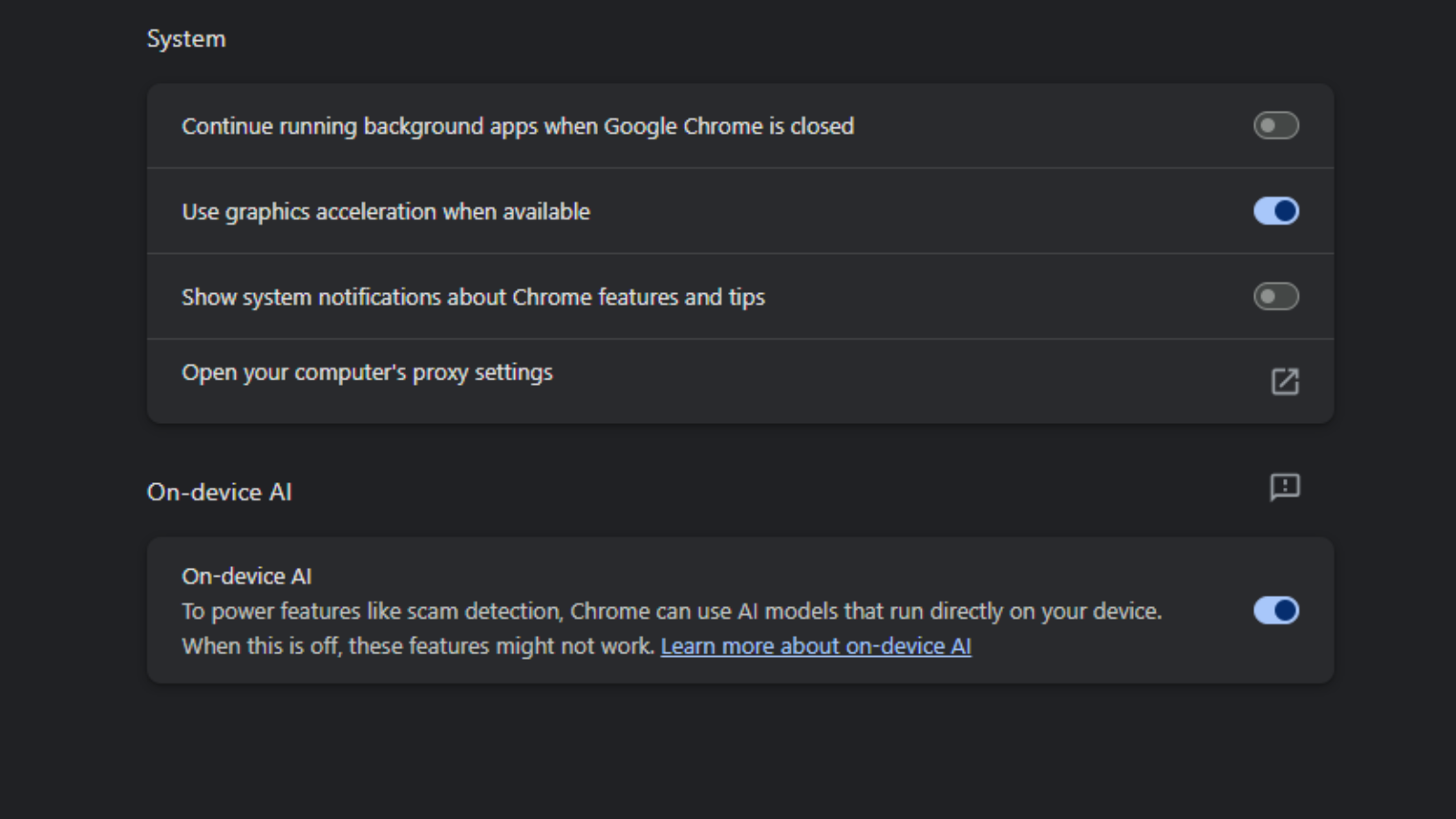
That isn’t entirely true. The bit about Chrome silently installing a 4GB AI file — is true. But we stumbled across an in-browser setting (three dots > Settings > System > On-device AI) that allowed us to disable the feature. If Google is to be believed, flicking that setting to ‘off’ is enough to stop the file from infecting your machine.
Google responded to Engadget’s report of the story, confirming as much:
“We’ve offered Gemini Nano for Chrome since 2024 as a lightweight, on-device model. It powers important security capabilities like scam detection and developer APIs without sending your data to the cloud. While this requires some local space on the desktop to run, the model will automatically uninstall if the device is low on resources. In February, we began rolling out the ability for users to easily turn off and remove the model directly in Chrome settings. Once disabled the model will no longer download or update. More details in our help center article.”
While it may not be the end of the world (it certainly isn’t helping, if Hanff’s maths is right), there’s no denying that Google has been shady. Rolling out a simple toggle more than a year after it began deploying the files to its user base’s PC is… ethically dubious, to say the least. Doing it in the first place without asking, even more so.




1 Comment
Honestly, this is the kind of thing that makes people lose trust in big tech companies. Downloading a 4GB AI model in the background without clearly asking users first feels pretty invasive, especially for people with limited storage or bandwidth. Even if Google thinks on-device AI is “helpful,” users should still have the choice to opt in.
The part about Chrome re-downloading the file after deletion is what really crosses the line for me. That makes it feel less like a feature and more like forced adoption.
I’m not against AI features at all, local/on-device AI can actually be better for privacy compared to cloud processing, but transparency matters. A simple popup saying “Do you want to install Gemini Nano for offline AI features?” would avoid most of this backlash.