After teasing the feature for the past four years, Spotify is finally rolling out lossless music streaming to its premium subscribers, starting with “select countries”.
Thankfully, the feature doesn’t appear to require more money every month. The music streaming service has already increased its Premium prices in recent history (at least in South Africa), so that would be a bit cheeky. Still, we wouldn’t put that past it.
I can hear Spotify clearly now
“The wait is finally over; we’re so excited lossless sound is rolling out to Premium subscribers,” said Gustav Gyllenhammar, VP Subscriptions, Spotify. “We’ve taken time to build this feature in a way that prioritizes quality, ease of use, and clarity at every step, so you always know what’s happening under the hood. With Lossless, our premium users will now have an even better listening experience.”
It isn’t quite the full-fat experience some purists were probably hoping for. With lossless selected as your preferred streaming quality, your music will be capped at 24-bit/44.1 kHz FLAC. That’s still a massive improvement over the ‘very high’ streaming quality of 320kbps using the OGG Vorbis format. There was no mention of spatial audio support, however.
Don’t expect your data to last nearly as long, with all that extra bandwidth. Spotify says lossless streaming can use up to a Gigabyte per hour, compared to the 0.14Gb per hour of ‘very high’. Users also have the option to specify streaming lossless for individual listening methods (cellular, Wi-Fi, or downloads).
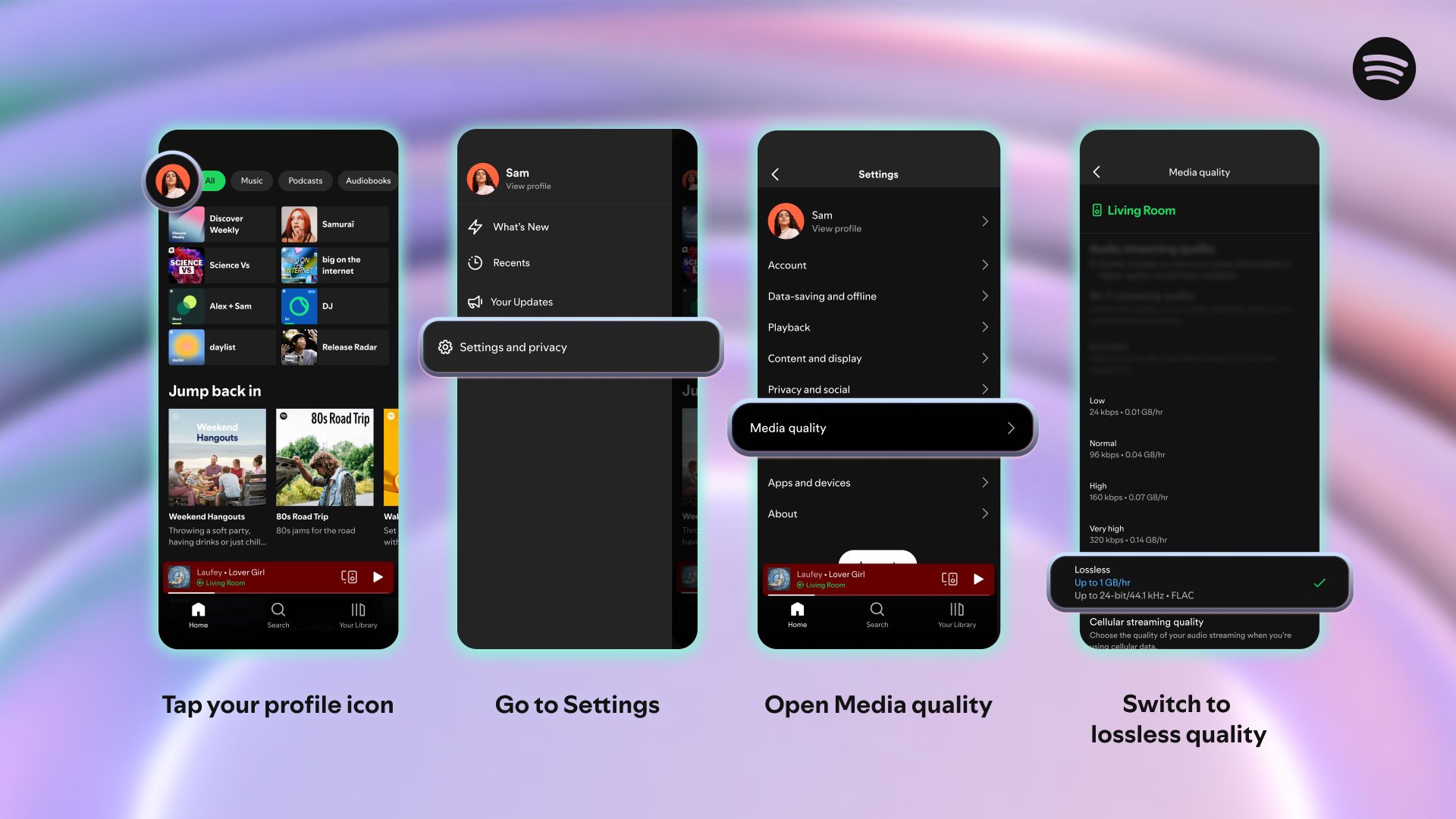 The feature doesn’t appear to have rolled out to South Africa just yet. But when it does, you’ll have to manually select lossless streaming on each device, with mobile, desktop, and tablet supported. Devices that support Spotify Connect should also provide lossless playback. The company mentions Sony, Bose, Samsung, and Sennheiser, but adds support for Sonos and Amazon devices should arrive “next month”.
When it arrives, enabling the feature seems easy enough. Tap on your profile in the top left (if you’re on mobile) > Go to Settings & Privacy > Select where you want to use lossless streaming. You should see confirmation of your choice in the Now Playing bar and in the Connect Picker.